Exceptional Event Template Generator
How to Generate a Template
- Enter your AQS Site ID and the Exceedance Day.
- Choose the Design Value Year you are targeting.
- Select the Prescribed Fire Agency that initiated the prescribed fires.
- In Fire Near Monitor, review prescribed fires occurring within 7 days before the exceedance day that are attributable to the selected agency. Select one or more fires to include in the Exceptional Event demonstration.
- Click Submit to generate the template below.
Exceptional Event Demonstration for an Exceedance of the [placeholder] Annual PM2.5 NAAQS at [placeholder], California on [placeholder] Due to Smoke From a [placeholder]
[placeholder]
Prepared by:
[placeholder]
California Air Resources Board
Submitted to the EPA by:
[placeholder]
California Air Resources Board
Contacts:
John Doe1, My Air District (johndoe1@myairdistrict.com)
John Doe2, My Air District (johndoe2@myairdistrict.com)
John Doe3, My Air District (johndoe3@myairdistrict.com)
I. Introduction
I.a. Overview
1. Start by providing the context of the event. Include details such as the type of event, its purpose, and the location where it occurred. Briefly explain the objectives or rationale behind conducting the event.
2. Describe the impact of the event on air quality. Highlight how the event affected specific areas and monitoring sites. Include relevant data or measurements that demonstrate the exceedance or other impacts caused by the event.
3. State the purpose of the demonstration. Explain why the data is being excluded or reviewed, referencing applicable regulations or rules. Mention any agencies or organizations involved in preparing the demonstration and their roles.
4. Discuss the regulatory and data implications. Explain how the exclusion of the data affects regulatory outcomes or compliance with standards. Include a comparison of values before and after the data exclusion, if applicable.
Table 1. Exceedance monitor, date, and concentration for this demonstration.
| Date | Monitoring Site | Concentration (µg/m³) |
|---|
5. Highlight any collaboration and guidance used in preparing the demonstration. Mention the agencies or organizations involved and reference any relevant guidance documents or rules followed during the preparation process.
6. Include details about requests or deadlines related to the demonstration. Specify the timeline for submission and any communications or responses from reviewing authorities.
7. Conclude with the importance of the demonstration. Explain how it serves as an example for future events or regulatory reviews. Emphasize the significance of addressing the event in the context of current and potential future standards.
Table 2. [Monitoring Site] [Years] DVs for the 2012 annual PM2.5 NAAQS.
| Monitoring Site | ||
|---|---|---|
I.b. Background-Geography/Topography
1. Provide an overview of the agencies or districts involved, describing their jurisdiction and roles in the area under discussion.
2. Summarize the geographical context, including the location and size of the region, significant geographical features, and its relation to nearby areas or boundaries.
3. Describe the topography and climate, highlighting variations in elevation, terrain types, and seasonal weather patterns. Include any relevant factors that contribute to climatic diversity within the region.
4. Discuss population and infrastructure characteristics, such as population distribution, major towns or cities, and their roles in the area.
5. Explain factors that affect air quality, including regional wind patterns, pollutant dispersion challenges, and any phenomena like temperature inversions that impact pollutant concentrations.
I.c. Background-Monitoring
1. Provide an overview of the event, including type, location, and date.
2. Include a brief explanation of how the event caused an exceedance of the PM2.5 NAAQS.
I.d. Background-Emissions
1. Provide an overview of the event, including type, location, and date.
2. Include a brief explanation of how the event caused an exceedance of the PM2.5 NAAQS.
3. Data is available through the Online NEI Data Retrieval Tool, which can be accessed through a link from the webpage https://www.epa.gov/air-emissions-inventories/
II. Narrative Conceptual Model
This section addresses the EER requirement at 40 CFR 50.14(c)(3)(iv)(A), which calls for a narrative conceptual model describing the event that caused the exceedance and explaining how emissions from the event led to the exceedance at the affected monitor. This section also summarizes how mitigation requirements in 40 CFR 51.930(a) were addressed.
II.a. Event Progression and Emission Impacts
1. Provide a brief overview of the prescribed fire event, including the project name, ignition dates, general location, and the main purpose of the burn.
2. Describe the project goals, such as reducing hazardous fuels, improving forest or rangeland health, enhancing wildlife habitat, or supporting community protection.
3. Reference any relevant environmental documents (for example, NEPA analyses or land management plans) and explain how the project fits within broader land management objectives.
4. Identify the specific burn units or treatment areas, including their size and key geographic details (for example, coordinates, elevation range, nearby communities, or features shown on the project map).
5. Summarize the regulatory framework under which the burns were conducted, including any required permits, approvals, or smoke management program (SMP) authorizations.
6. Describe the operational timeline: planning, approval, ignition, holding, and mop-up activities. Note any key decisions related to smoke management (for example, go/no-go decisions or changes to the ignition plan).
7. Explain how meteorology and topography influenced smoke movement on the event days. Reference data or tools (such as forecast products, HYSPLIT trajectories, or other dispersion or plume tools) that show how smoke was transported toward the affected monitor.
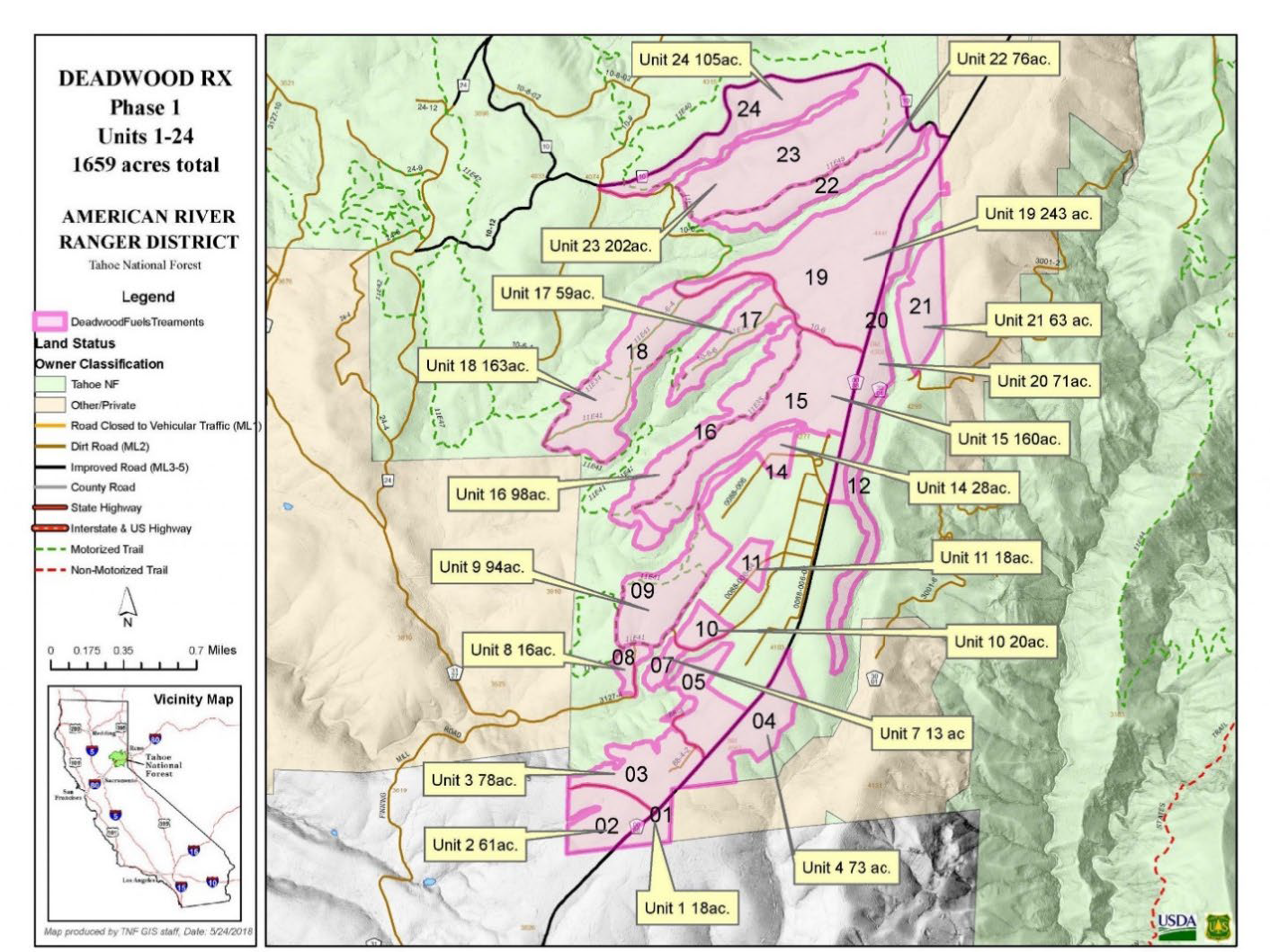
Figure 4. Example map of the prescribed fire project and burn units (placeholder – replace with the project-specific map used in this demonstration).
II.b. Mitigation of the Event
Before a prescribed fire is ignited, the burner and the air district are responsible for taking steps to reduce public exposure to smoke and to meet the mitigation requirements in 40 CFR 51.930(a). These steps help ensure that the public is informed, understands how to reduce their smoke exposure, and is protected through smoke-management practices required under State and County Smoke Management Programs (SMPs). The following three areas—public notification, public education, and on-the-ground smoke-management measures—demonstrate how the burner and air district planned for and implemented actions to minimize smoke impacts during this prescribed fire event.
1. Public Notification: Describe how the public was notified when smoke impacts or elevated concentrations were possible. For example, note any news releases, email lists, web updates, or social media posts used to reach local communities and sensitive groups.
2. Public Education: Summarize the information provided to help people reduce smoke exposure. This may include recommendations to stay indoors, limit outdoor activity, use clean-air rooms or filtration devices, or relocate if necessary. Indicate how this information was shared (for example, website, flyers, social media, or direct outreach).
3. Health Protection and Smoke Management Measures: Explain how the fires were conducted under State and County Smoke Management Programs (SMPs) or similar frameworks. Describe key requirements, such as evaluating alternatives to burning, identifying smoke-sensitive areas, conducting test fires, monitoring weather and smoke, and stopping or adjusting ignition if conditions became unfavorable. Reference the specific smoke management plan(s) and any documentation that shows how these measures were applied.
II.c. Conclusion
1. Identify the prescribed fire project by name, location, and ignition date, and briefly restate its main purpose under the Exceptional Events Rule (EER) context.
2. Summarize the exceedance at the affected monitor, including the date, pollutant (24-hour PM₂.₅), the standard exceeded (for example, the 2012 annual PM₂.₅ NAAQS), and the monitoring site name.
3. Describe how smoke was transported from the burn area to the monitor, highlighting the role of local meteorology and topography and the time period when the monitor recorded elevated concentrations.
4. Briefly restate the main mitigation actions (public notification, public education, and SMP-required measures) and how they were implemented for this event.
5. Conclude by stating that, based on this narrative conceptual model and supporting evidence, you are requesting EPA concurrence to exclude the identified exceedance from regulatory determinations under the Exceptional Events Rule.
III. Clear Causal Relationship
This section addresses the EER requirements at 40 CFR 50.14(c)(3)(iv)(B) by showing that the event affected air quality in such a way that there is a clear, causal relationship between the specific event and the monitored exceedance. It also addresses 40 CFR 50.14(c)(3)(iv)(C) by comparing the claimed event-influenced concentrations to concentrations at the same monitoring site at other times. The Prescribed Fire Guidance and Wildfire Ozone Guidance describe the expected components of a clear causal relationship analysis. These include a comparison of the event-related concentration to historical concentrations, evidence that emissions from the [prescribed fire or wildfire] were transported to the monitor, and evidence that those emissions affected the monitor.
III.a. Comparison to Historical Concentrations
1. Clearly identify the monitoring site (name and AQS ID), pollutant (24-hour PM2.5), and time frame used for the historical analysis (for example, the most recent 5-year period used for the design value).
2. Describe the datasets and data sources used (for example, AQS, AirNow, or state databases), including any differences in completeness, sampling frequency, and quality assurance status that are relevant to interpreting the results.
3. Present visual summaries of historical 24-hour PM₂.₅ concentrations (for example, time series plots, scatter plots, or box-and-whisker plots) that show how concentrations vary over time, with emphasis on periods when elevated values commonly occur (such as the typical fire season).
4. Clearly distinguish between flagged and unflagged data in the figures and text. Discuss how elevated concentrations line up with known fire events or other external influences, and note any instances where high concentrations occur in the absence of such events.
5. Provide statistical comparisons (for example, daily rank, percentile, and monthly averages) that show how the event-day concentration compares to the full historical record. Use tables and figures to highlight whether the event day is among the highest observed values.
6. Examine seasonal patterns by summarizing historic PM₂.₅ concentrations for the same months or season as the event. Explain how the event-day concentration compares with typical seasonal averages and higher-end percentiles (for example, 90th or 95th percentile values).
7. Summarize the key findings from the historical comparison, including: (a) where the event day falls in the site’s historical distribution, (b) how much flagged data influence the statistics, and (c) how these results support a clear link between the event and the exceedance.
| Event Date | Concentration (µg/m³) | 1-year Rank | 1-year Percentile | 5-year Rank | 5-year Percentile |
|---|
| Month | Average No Flags (µg/m³) | Average (µg/m³) | Maximum No Flags (µg/m³) | Maximum (µg/m³) | Standard Deviation No Flags (µg/m³) | Standard Deviation (µg/m³) | Number of Exceedances | Number of Flags |
|---|
| Event Date | Concentration (µg/m³) |
|---|
III.b. Evidence that Emissions were Transported from the Prescribed Fire to the Monitor
1. Briefly describe the event (type of fire, ignition date and time, burn unit size, fuel type, and location) and the affected monitoring site, including the distance and direction between the fire and the monitor.
2. Summarize the key meteorological conditions on the event day (for example, wind direction and speed, mixing height, stability, and presence of inversions) that would support smoke transport from the burn area toward the monitor.
3. Present maps, trajectory analyses, or model outputs (such as HYSPLIT, BlueSky, or other tools) that show the pathway of smoke or pollutant plumes from the fire to the monitoring site during the time of elevated concentrations.
4. Highlight how the timing of the modeled or observed plume transport aligns with the timing of the monitored PM₂.₅ peak, and explain why this supports a direct transport link between the prescribed fire and the monitor.
III.c. Evidence that Prescribed Fire Emissions Affected the Monitor
1. Describe the observed PM₂.₅ concentration pattern at the monitor on the event day, including the magnitude and duration of elevated concentrations and how they differ from nearby days without fire activity.
2. Summarize supporting observations that indicate smoke impact at or near the monitor, such as visibility reduction, photographs, satellite imagery, aircraft or ground observations, or air quality index reports.
3. Present any available speciated PM data (for example, carbon fractions, potassium, or other smoke tracers) or co-pollutant patterns (such as ozone or CO) that support a biomass-burning influence on the monitor.
4. Explain why other potential sources (such as local industrial sources, non-event-related area sources, or regional background) are unlikely to account for the magnitude and timing of the observed PM₂.₅ exceedance, thereby strengthening the conclusion that the prescribed fire affected the monitor.
III.d. Conclusion
1. Briefly restate the event (type, location, and date) and the affected monitoring site, noting the observed 24-hour PM₂.₅ concentration and whether it contributed to a design value exceedance.
2. Summarize how the historical data analysis shows that the event-day concentration is unusual compared with typical conditions at the site, particularly when compared with non-event days in the same season.
3. Recap the key lines of evidence for transport (meteorology, trajectories, and plume analyses) and for impact at the monitor (observations, speciated data, and comparison to other sources).
4. Conclude that, taken together, these lines of evidence demonstrate a clear, causal relationship between the prescribed fire and the monitored exceedance, consistent with the requirements of 40 CFR 50.14(c)(3)(iv)(B)–(C).
IV. Human Activity Unlikely to Recur at a Particular Location
This section explains why the prescribed fire event meets the Exceptional Events Rule criterion that the human activity causing the exceedance is unlikely to recur at this location. It summarizes how often prescribed fire is typically needed in this ecosystem, how long the fire-return interval is, and why exceedances from similar events are not expected to occur frequently. By describing the ecological role of fire, planned treatment cycles, and long-term fuel reduction benefits, this section shows that future burns at this site are infrequent, carefully managed, and unlikely to cause repeated exceedances.
IV.a. Prescribed Fire Frequency Needed to Establish, Restore, and/or Maintain a Sustainable and Resilient Wildland Ecosystem
1. Describe why prescribed fire is needed in this specific area.
Explain the ecological reasons for using prescribed fire in this landscape. Include brief details about fuel conditions, ecosystem type (such as mixed-conifer forest, chaparral, or grassland), and how fire historically played a role in keeping the system healthy and resilient.
2. Provide the typical burn frequency for maintaining this ecosystem.
Include the recommended fire-return interval (for example, every 5–15 years) based on local land management plans, scientific studies, or agency guidance. Explain why this interval is considered necessary to reduce hazardous fuels and prevent larger, high-severity wildfires.
3. Explain how often the specific burn unit or project area is expected to be treated.
Clarify whether this prescribed fire was part of a regular maintenance cycle or a one-time treatment after many years without fire. Note when the unit was last burned (if known) and when it is expected to be burned again.
4. Describe why this type of exceedance is unlikely to recur at this location.
Summarize how the planned return interval, improved fuel conditions, and reduced fuel load make future exceedances unlikely. Emphasize that once fuels are reduced, smoke impacts decrease over time and become easier to manage.
5. Reference supporting plans or documents.
Point to land management plans, forest or vegetation management plans, ecological restoration strategies, or burn plans that justify the burn frequency and explain why routine future burns are less likely to cause exceedances.
IV.b. Conclusion
1. Summarize the key point: exceedances are unlikely to recur regularly.
Briefly restate that prescribed fires in this area occur infrequently and are designed to prevent larger, uncontrolled wildfires, which would cause far greater and more frequent smoke impacts.
2. Restate the expected burn cycle and mitigation.
Note that the planned fire-return interval, reduced fuel loading, and ongoing smoke-management practices all reduce the likelihood of future exceedances.
3. Explain why this event qualifies under the EER “unlikely to recur” provision.
State clearly that the combination of ecological need, long treatment intervals, improved fuel conditions after treatment, and regulatory oversight supports that exceedances from similar events at this location are not expected to occur often.
4. Close with a clear statement supporting exclusion.
Conclude that, based on the infrequency of prescribed burns, the burn interval recommended for this ecosystem, and the mitigation measures in place, the exceedance at this monitor should be considered unlikely to recur and therefore eligible for exclusion under the Exceptional Events Rule.
V. Not Reasonably Controllable or Preventable
This section explains why the exceedance associated with this prescribed fire meets the Exceptional Events Rule requirement that it was not reasonably controllable or preventable. It describes the steps the burner and air district took before and during the burn to reduce smoke impacts, the limits on what could be controlled under the State and County Smoke Management Programs (SMPs), and the factors—such as weather variability and terrain-driven smoke movement—that could not have been avoided with reasonable planning. Together, these points demonstrate that the exceedance could not have been fully controlled or prevented even with appropriate mitigation in place.
V.a. Not Reasonably Controllable
1. Describe why the exceedance could not have been reasonably controlled.
Explain the land management, safety, or ecological reasons why the burn could not be conducted in a way that fully avoided smoke impacts. Note factors such as limited burn windows, required fuel-reduction needs, weather or terrain constraints, and the limited ability to further modify ignition without jeopardizing project objectives or safety.
2. Summarize the measures that were already taken to minimize smoke.
Reference the smoke management practices, approvals, public notifications, meteorological checks, test fires, and real-time monitoring carried out by the burner or air district. Emphasize that these measures meet or exceed State and County Smoke Management Program (SMP) requirements.
3. Explain why additional controls were not feasible.
Clarify why further reductions—such as eliminating the burn, reducing acreage, or delaying ignition—would have created safety risks, failed to meet ecological objectives, or increased long-term fire risk. Discuss how the chosen approach represented the most reasonable and practical level of control.
V.b. Not Reasonably Preventable
1. Explain why the exceedance could not have been prevented despite planning and mitigation.
Describe how the burner and air district selected the optimal burn window based on forecasts, fuel conditions, transport winds, and expected smoke dispersion. Emphasize that all SMP requirements were followed and that conditions appeared acceptable at the time ignition began.
2. Identify unexpected or unavoidable factors.
Note any shifts in meteorology (such as overnight drainage flows, wind shifts, inversions, or lower-than-expected mixing heights) that contributed to smoke moving toward the monitor. Explain how these factors were within normal variability and could not have been fully prevented with reasonable planning.
3. Clarify why canceling or stopping ignition would not have reasonably prevented the exceedance.
Explain whether ignition had already progressed, whether fuels were already engaged, or whether stopping the burn would have created risk to personnel or the landscape. If applicable, explain that stopping ignition would not have prevented residual smoke from drifting into the area.
V.c. Conclusion
1. Summarize why the exceedance meets the “not reasonably controllable or preventable” criterion.
Highlight that all required mitigation steps were implemented, SMP conditions were followed, and the burner and air district exercised appropriate control and oversight.
2. Restate the key factors outside the ability of the burner or air district to fully control or prevent.
Mention meteorological variability, terrain-driven flows, or other uncontrollable elements that contributed to smoke reaching the monitor.
3. Conclude with a clear statement supporting EER eligibility.
State that, based on the implemented mitigation, regulatory compliance, and the uncontrollable and unavoidable nature of the exceedance, this event qualifies as “not reasonably controllable or preventable” under the Exceptional Events Rule.
VI. Public Comment
This section describes how the public comment requirements in 40 CFR 50.14(c)(3)(iv)(A–C) were met. It documents the public comment process, the posting of the demonstration for review, the duration of the comment period, and whether any comments were received that disputed or contradicted factual evidence in the demonstration.
1. The State or air district must provide a public comment period of at least 30 days, which may run concurrently with EPA’s review period.
2. All comments received must be submitted as part of the final demonstration package.
3. The demonstration must respond to any comments that challenge or dispute evidence presented in the analysis.
The demonstration was posted for public comment on the following webpage:
[Insert public notice URL here]
The public comment period began on [start date] and ended on [end date], meeting the minimum 30-day requirement. The posting informed the public that comments related to the technical merits of this event and demonstration under the Exceptional Events Rule could be submitted to [district email address]. No public comments were received.
VII. Conclusions and Recommendations
This section provides a brief summary of the event, the exceedance, and the supporting evidence presented in the demonstration. It also highlights the key conclusions related to the Exceptional Events Rule criteria and presents the recommendation for excluding the exceedance from regulatory decisions.
1. Summarize the event and exceedance:
Identify the prescribed fire or event, including the date, project name, and location.
State the date and concentration of the PM2.5 exceedance at the affected monitor and the applicable NAAQS.
2. Summarize key findings from the demonstration:
Highlight the major points from the Narrative Conceptual Model, Clear Causal Relationship, Human Activity Unlikely to Recur,
and Not Reasonably Controllable or Preventable sections.
Emphasize the evidence showing that the event caused the exceedance and that all required mitigation and smoke-management measures were followed.
3. Conclude that the event meets the Exceptional Events Rule criteria:
State clearly that the evidence supports meeting each applicable criterion under 40 CFR 50.14,
including causality, mitigation, rarity, and uncontrollability.
4. Provide the final recommendation:
Recommend that the exceedance be excluded from regulatory determinations, such as design value calculations or attainment assessments,
based on the evidence presented in this demonstration.
Related Resources